Sony Vegas Pro 11: Slow/Fast Motion Tutorial

This is part 4 of my beginner’s series for Sony Vegas Pro 11. In this Sony Vegas Pro 11 tutorial, I’m going to be showing you guys two methods of applying fast or slow motion to your footage. These two methods are very simple to use for a quick slow/fast motion in your video. This effect can be applied to any footage. But in order to get the smoothest slow-motion, you would normally want to record the footage you are editing at a high frame rate. All videos are a sequence of images, and in this case, we are going to be taking those frames and “spreading them out”, which is the overall basic process for creating slow-motion. With that being said, it’s common sense that the more frames you record, the smoother looking the footage will be. Want more tutorials on using Sony Vegas Pro 11 for beginners? Then post your suggestions in the comments down below.

Post Footer automatically generated by Add Post Footer Plugin for wordpress.
Aerohead – Repeatable Remote Camera Head – Pacific Motion Control

The Aerohead is a fully repeatable remote camera head that can be configured as a 2 or 3 axis head (pan/tilt, or pan/tilt/roll). It is capable of carrying full sized film camera packages, and is equally at home with a Panavision or Arri 35mm Film camera, as with a Red One or Sony HD camera. It can also interface with Preston lens controls and lens motors, and can record and play back lens movements along with camera movements. The Aerohead features very quiet servo motors, so it is great for sound sync environments. A typical Aerohead package includes a 2 or 3 axis camera head, Aerohead control panel, Pan/Tilt/Roll handwheels or pan bar, Preston Interface, Preston FI+Z 2 wireless lens controller, Preston lens motors, a bloop light (for syncing multiple takes), power supply, and all necessary cables. This complete package can be shipped in just a few flight approved cases. Pacific Motion Control has a large rental inventory of repeat heads, remote heads, and motion control camera heads, including 2 and 3 axis Aeroheads, the Talon 2 axis repeat/remote camera head, and our 2 and 3 axis stepper and servo motion control camera heads. The Aerohead and Talon are equally well suited for cranes, jibs, dollies, and sticks. Our motion control camera heads can be used alone, or with our motion control cranes and dollies, for up to 9 axes of motion (Track/Dolly, Boom, Swing, Pan, Tilt, Roll, Focus, Iris, Zoom). Additionally, our Kuper motion control software can control additional
Video Rating: 5 / 5

From the popular all-free photography education website www.FreePhotoCourse.com – Learn to understand and use the manual exposure settings on your point-and-shoot or DSLR digital camera. This 10-minute video explains all there is to know about manual exposure control, including ISO, F-stops and Shutter Speed adjustments. Visit FreePhotoCourse.com for more totally free photo lessons, tips, how-to’s, contributor’s gallery, photography forum, and discount camera and photo gear store!

Post Footer automatically generated by Add Post Footer Plugin for wordpress.
Panning Photography Video Tutorial – How to Capture Motion Shooting Moving Subjects

Panning Photography Video Tutorial - How to Capture Motion Shooting Moving Subjects

Panning is a photography technique that plays on the in-camera motion blur. We all know what happens when you let your shutters drop too low while shooting moving objects. You get a blurry, less-than-sharp image capturing the movement in a still frame. Now imagine shooting the same moving subject at a low shutter, but instead of holding the camera still in one place, you move the camera along with the subject, following the moving subject so that the subject remains in the exact same part of the frame the entire time that the shutter is open. You get a relatively crisp subject, with a dynamic, moving, blurry background. This is what photographers call panning photography. This past week, we thought we would create a nice little video tutorial on how to shoot panning photography. Of course, we felt like we needed to do it SLR Lounge style. As always, you will have to watch the video to find out exactly what that means.
Video Rating: 4 / 5

In this week’s episode Mark Wallace explains the Inverse Square law and how it can improve your photography.
Video Rating: 4 / 5

Post Footer automatically generated by Add Post Footer Plugin for wordpress.

Digital Photography 1 on 1: Episode 15: Panning

In this episode Mark talks about panning. Panning is an easy way to create motion in your images. Use it for shooting sports, kids or anytime you want to create some motion in your shots.

Watch a clip from the Beauty and the Beast photography seminar. John Woodward explains composition.
Video Rating: 4 / 5

Post Footer automatically generated by Add Post Footer Plugin for wordpress.

HAGUE MMC Stabilizer – Canon T2i Steadicam Test – DSLR

Testing out the Canon T2i on the HAGUE MMC – Mini Motion-Cam Stabilizer. (Steadicam) This is my first time using this steadicam with my DSLR. The Hague is easy to setup and operate and the results are nice for the price of this stablizer. The key is getting it balanced and then your good to go! More info on the steadi cam: www.b-hague.co.uk Canon Rebel T2i Lens: Tamron AF 28-80mm Standard Lens Video was shot in 1920 x 1080 30 Thanks for watching! Leave a Comment and Subscribe!

Post Footer automatically generated by Add Post Footer Plugin for wordpress.

DSLR Tips: Aperture, Shutter Speed, ISO

On this episode we try to tackle the relationship of aperture, shutter speed and ISO. I also give my review of the Motion Slider 36! www.photovideoshow.com http Equipment used in this video: Nikon D7000 – amzn.to Nikkor 50mm F1.4 – amzn.to Nikkor 18-70mm F3.5 – amzn.to Motion Slider 36 – amzn.to
Video Rating: 4 / 5

Post Footer automatically generated by Add Post Footer Plugin for wordpress.

Demonstration of Canon’s 7D Slow Motion Capability. (PLUS camera man gets drenched!!!)

www.KarlTaylorPhotography.Com This time our camera man gets a complete soaking! You are probably well aware that major manufacturers of DSLR cameras (including Nikon & Canon) have had HD video capability as standard in many of their camera models for some time now. Some modern DSLR cameras are even capable of filming at 60 frames per second – Perfect for the slow motion techniques demonstrated in this short video. I hope you enjoy! Karl Learn More HD Video Techniques at www.KarlTaylorPhotography.Com
Video Rating: 4 / 5

dombowerphoto.blogspot.com Little video to remind some photographers about the auto focus illuminator on your camera and sb speed lights with single focus motor drive

Post Footer automatically generated by Add Post Footer Plugin for wordpress.

Stop Motion Pro Action! HD Reviews

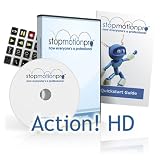
Stop Motion Pro Action! HD

Stop Motion Pro Action! HD

  • Stop Motion Pro is a software tool for making stop motion and other animated films. It requires a video camera, webcam or digital still camera and is compatible with Win XP, Vista and Windows 7
  • Stop Motion Pro Action! HD is the “next step up” from Stop Motion Pro Action! Plus. The Action! HD edition includes most of the tools found in the high end verisons of Stop Motion Pro.
  • Compatible with Canon and Nikon DSLRS, including those models with live view, most webcams and video cameras
  • Preview animation as you film it instantly, Edit your animation with thumbnail views
  • Available in English, French, German and Spanish languages

Stop Motion Pro is the software used to bring the clay characters Wallace and Gromit to life. Stop Motion Pro stores each frame on the computer, not video or film. Using a video camera, digital still camera or webcam, a Windows PC and Stop Motion Pro it is possible to capture one frame of a puppet or object, make a small change and then capture another frame. After this is repeated several times the illusion of movement builds. Stop Motion Pro has been designed for those who want to make animate

List Price: £132.99

Price:

Find More NIKON DSLR CAMERA Products

Post Footer automatically generated by Add Post Footer Plugin for wordpress.